Viewing Microsoft PowerPoint Shows
For those who have PowerPoint or PowerPoint Viewer:
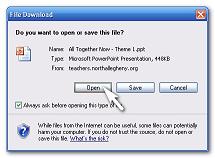
1. Click on the title of a reading theme
2. Click 'Open' when the box pops up
3. Use the left mouse button or the arrow keys to advance the slides
For those who don't have PowerPoint or PowerPoint Viewer:
1. Click on the icon ( )
beside the reading theme title
2. This will play the PowerPoint through your internet browser
3. Use the left mouse button or the space bar to advance the slide
*You can also download Microsoft PowerPoint Viewer for a smoother presentation with animation here.
You can then follow the top instructions to view the presentation.
Please note that all PowerPoint Presentations are not provided to be copied or distributed in any way.
Copyright © 2007-2008 Nicholas Amoscato
All Rights Reserved